Changelog

What changed, version by version

Every version of Control Room, newest first. Each one is also a release on GitHub.

0.1.13

A company brain, and one click to the merge

What an agent learns used to stay in its chat. Now it can go into a brain: your company's or your own. And going from an idea to a merged pull request takes one click less at every step.

Brains (Beta)

A brain is a folder of notes: a company brain shared with the team, or your own personal brain. Agents read them before they start and, with Agents write on, write down what they learn. Ask a brain a question in a thread of its own; a brain in Git is committed and pushed for you.
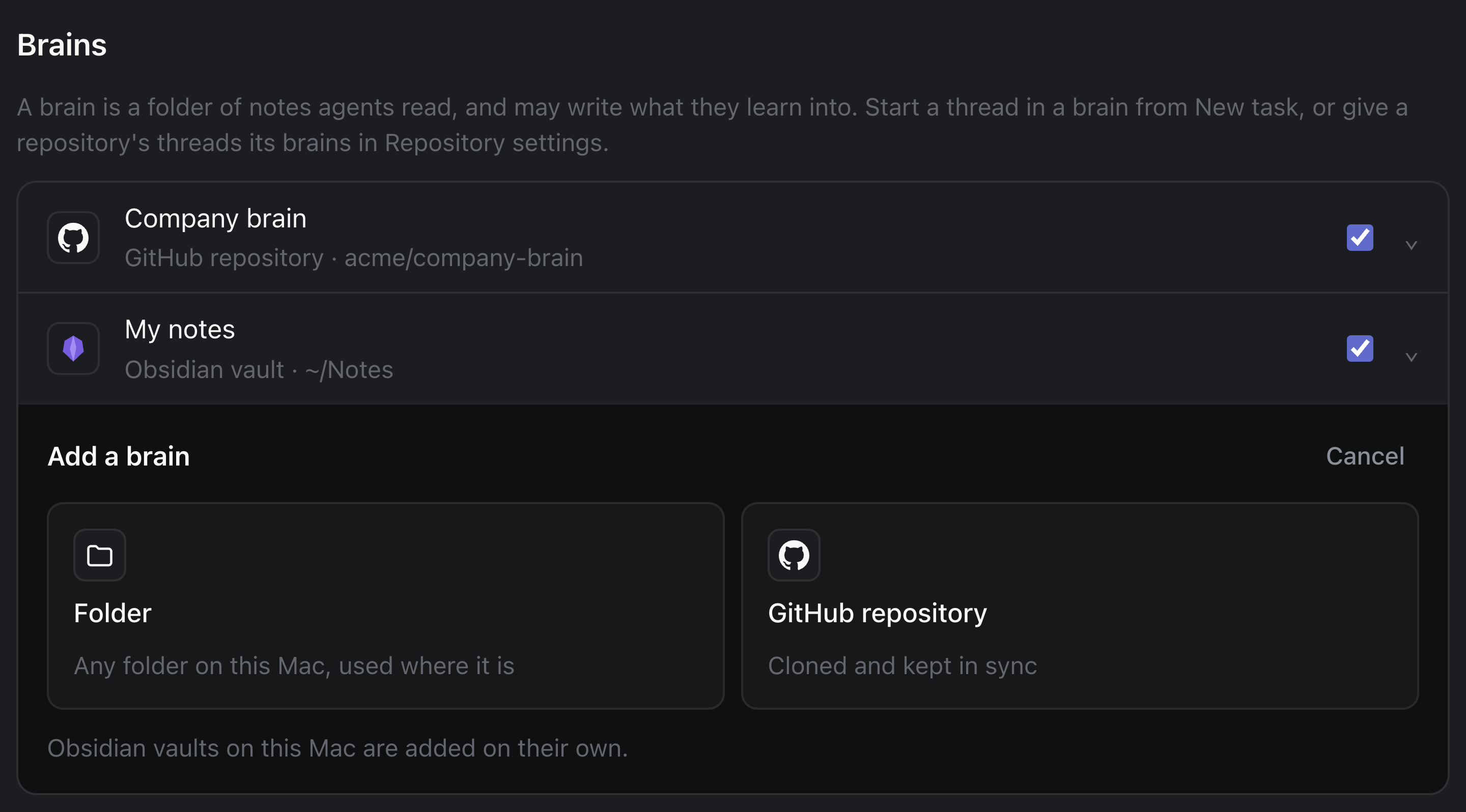
Settings › Brains: Company brain, a GitHub repository, and My notes, an Obsidian vault, both on; Add a brain open on Folder or GitHub repository, Obsidian vaults added on their own

Merge in one step

A Merge it reply runs the step bar's Merge, every step to the merge. Before any code exists, the step bar offers Create PR and Merge too: the agent builds it, then opens the pull request or merges it.

Updates wait for your threads

A downloaded update shows a card with its highlights. Restart when settled waits for working threads and unsent messages, then restarts; after it, a card says what came.

Agents set the order

An agent whose merge needs another fix first makes its thread wait for that one, and a follow-up only its merge allows, such as a release, is proposed to start by itself once this thread merges or is put away. You no longer drag the waits into place yourself.

Also

  • A changed HTML file in the diff has a live Preview
  • A long paste folds into a [Paste N] chip; the agent gets the whole text
  • A snoozed task starts by itself when it is due
  • Right-click a sidebar row to snooze or archive it, or set its Priority…
  • Sidebar filters: Let through keeps urgent tickets in sight, ⌘. turns the filters off and on
  • Next thread can follow Sort by; Highest priority first is on by default
  • Ticket priority can show only Urgent and High, or only Urgent
  • Another provider starts on the equivalent model and effort, and the picker remembers each agent's effort
  • An agent can add a script or prompt to Repository settings › Scripts, with your Allow unless you chose bypass
  • Every thread is a chat, and shows each skill its agent uses; plain terminal tabs stay
  • Archiving warns about uncommitted files or an unmerged pull request, and Return brings the thread back
  • Question cards keep their line breaks, lists and code; a proposal's Reject… sits beside Approve…
0.1.12

A welcome screen, and work that waits its turn

Two ends of the day with Control Room. At the start, a welcome screen connects GitHub, Linear and Night Shift before your first task. At the end, a thread, a factory job or its pull request can wait for another, so work lands in the order it depends on.

Welcome

A new Mac opens on one screen that connects GitHub, Linear and Night Shift, each in a click, and says what each one is for.

Wait for it

Drag a thread onto the one it depends on. A proposed thread can make the current one wait for it, and a factory job or its pull request can wait for a thread too.

Markdown diffs you can read

A changed Markdown file shows rendered, with more lines of context and pictures before and after.

Also

  • New task goes on with a ticket's existing branch or worktree, and links a ticket from one menu
  • Resolve & merge beside Resolve conflicts
  • Select text in a thread, then Add to chat ⌘L
  • ⌘J follows Settings › Next thread; by default, the thread waiting longest
  • A running script's button stops it
  • A Disconnected card when a connection is lost
  • Sort by ticket priority, then by last activity or creation date
  • A copy button on Markdown tables
  • Continue at on an out-of-quota thread snoozes it and moves on
  • A cloud thread started on an existing branch works on that branch
  • A Mac on an older version never erases a synced setting it does not know
0.1.11

Merge checklists, and an all-clear screen

Merging should be the easy part. A repository now says what must be true before a pull request merges, and Start & merge follows it. And when nothing needs you, Control Room says so plainly instead of showing an empty list.

A merge checklist per repository

Declare the checks a merge needs, including ones read from GitHub. Start & merge waits for every item before it merges.

Threads that wait for threads

Drag a thread onto another to make it wait, and the dependency shows in Linear too. Factory and cloud rows can wait and be waited for; a wait that would close a loop is refused.

All clear

When no thread needs you, a calm screen says so. You can go do something else.

Also

  • A repository's tickets come from Linear, GitHub or both
  • ⌘L adds the selected text to your message
  • ⌘⇧A archives the open thread, and a finished thread proposes Archive
  • Where are we? is one pill that unfolds into the status card
  • A thread opens with your last question folded at the top
  • Cloud and computer runners are Beta core plugins, off by default
  • A Codex thread on Auto can push and open its pull request
  • Feedback is one step: Post files the issue
  • A thread that fails to start says why
  • A turn that ends with questions waits for your answer
  • Settings… ⌘, in the app menu
0.1.10

Statistics, community plugins, and a calmer room

The largest release so far, with five days of work in it. Three threads run through it: seeing what your agents did for you, making the app yours with plugins, and taking noise out of every screen, so what is left is what needs you.

Statistics

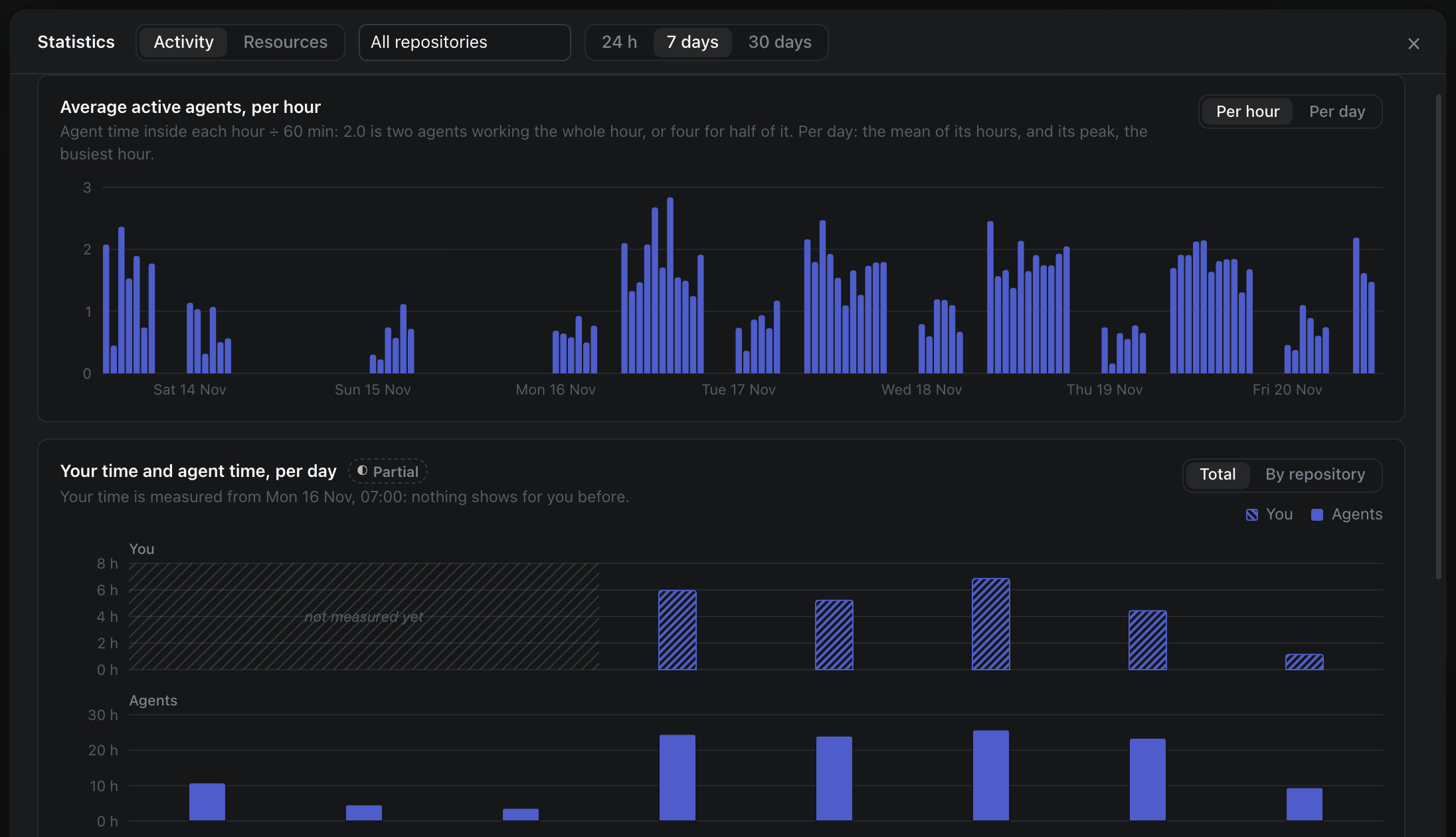
Agent time against your time, threads finished, pull requests merged, lines changed and your messages per finished thread. Per repository or in total, kept on Night Shift so every Mac adds up.

Statistics over 7 days: average active agents per hour, then your time and agent time per day

Community plugins

Install plugins from the public list in Settings. They arrive turned off and run only once you allow them. History and the context ring become core plugins you can switch off.

Many threads at once

Select several rows and act on them together. Cap how many threads work at once on this Mac; the rest queue and start as a slot frees.

From your Mac to the cloud and backBeta

Move a thread from this Mac to Claude cloud and bring it back, pictures included, with a cloud environment per repository. Since 0.1.11, this is the Cloud runners Beta core plugin. Hermes threads run on this Mac or over SSH.

Also

  • Choose what each sidebar row shows; rename a thread or change its ticket priority from a right-click
  • A thread's stage and next step sit on its input; Create PR and Commit & push say they work, and why they failed
  • Choose which thread opens after you reply or archive
  • Accept a plan with changes
  • When auto mode blocks an action, the agent asks you
  • Auto spreads threads across Claude accounts by the room each has left
  • Feedback in the app files a public GitHub issue
  • ⌘⇧S snoozes the open thread; snooze for 30 minutes; ⌥⌘↑ ⌥⌘↓ walk the sidebar
  • A stopped agent takes the processes it started with it
  • Less git and no MCP process per thread, and a Resources tab
  • Class diagrams, component views and timelines in the Diagrams plugin
0.1.9

Hand a thread to another computerBeta

Your Mac no longer has to stay open for the work to go on. A thread can move to another of your computers and come back, and its header always says who drives it and where it runs. This release also opens Control Room to any GitHub account.

Run by

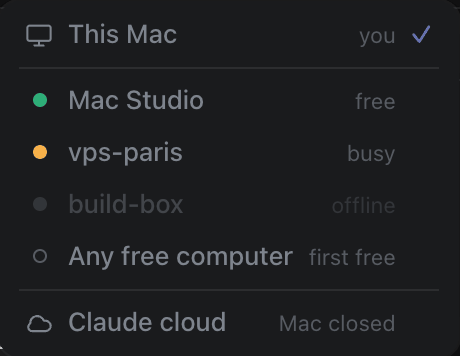
The menu after a thread's title hands it to a computer that takes its repository's work, and takes it back when you want. Since 0.1.11, computer runners are a Beta core plugin: turn it on in Settings, Core plugins.

The Run by menu: This Mac, Mac Studio free, vps-paris busy, build-box offline, Any free computer, and Claude cloud

Reply without the mouse

Reply buttons sit above the input: ⌘1–⌘4 press them, ⌃1–⌃9 jump to a thread, on AZERTY keyboards too.

Open to everyone

Any GitHub account can download Control Room and get its updates.

Also

  • Statistics per repository: your time, agent time, tokens
  • Sort the sidebar by ticket priority
  • Tags say what each thread is about
  • Queued work waits in its own folded Queued group
  • One thread, one branch, one pull request
  • Archiving a thread with no pull request closes its Linear ticket; a closed ticket is struck through
  • Chats cost less while replies stream
  • Terminals run in their own process, so the window stays quick
0.1.8

Secrets in a card, review before merge

A release about trust. Agents stop asking for keys in the chat, a merge asks for a review first, and the sidebar filters down to the machine, account or repository you care about.

Secrets in a card

When an agent needs a key, you type it in a card. It is saved to a file the agent reads, never written in the conversation.

Review before merge

Merge on an open pull request first asks the agent for QA and a review.

A sidebar you can filter

Show only the threads of one machine, account or repository.

Also

  • Share a design at a public link people can comment on
  • Agent providers shows which accounts are signed in, and the Codex usage left
  • A nicer repository picker, with ⌘1–⌘9
  • Snooze a proposed thread from its card, and start or snooze one proposed in another repository
  • One card per proposed thread
  • A signed-out Claude account asks you to sign in again
  • A faster model picker
0.1.7

Agents propose the next task

A week of work in one release. At its center is a simple idea: an agent that finds work outside its thread should not describe it in a paragraph. It should hand you the thread, brief written, ready to start. Around it come plans, live designs, diagrams, plugins, cloud threads and Start & merge.

Proposed threads

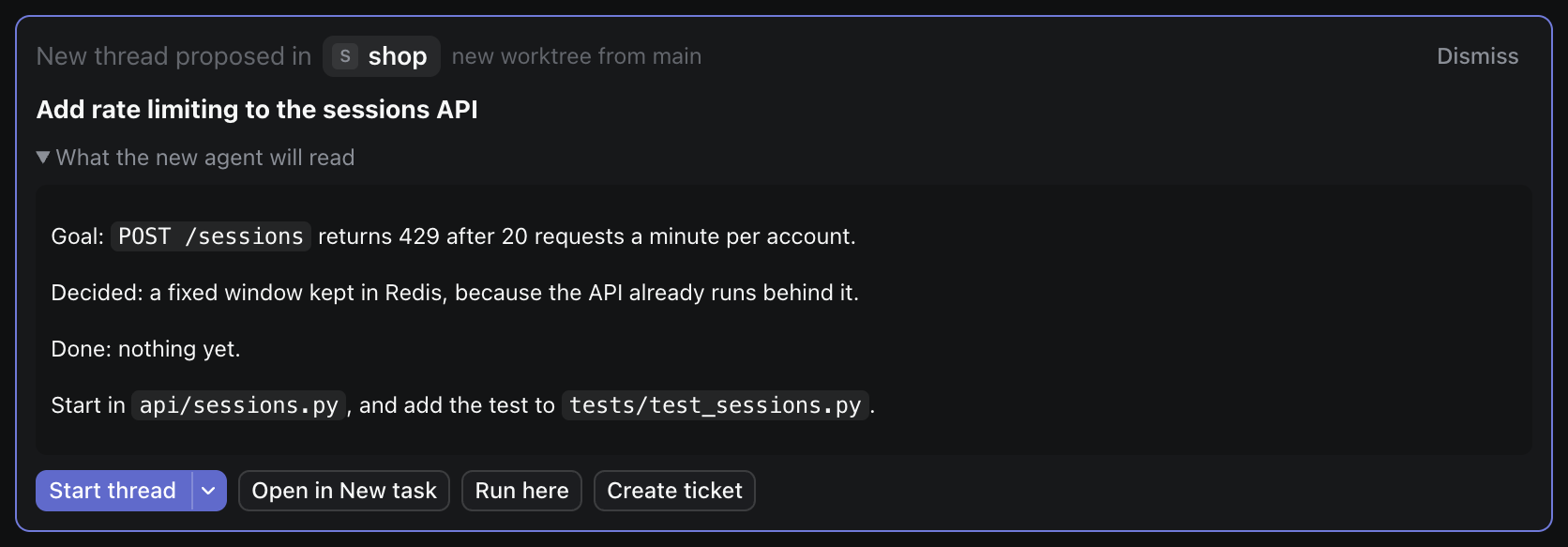
A card with the brief the new agent will read: start it, run it here, open it in New task, file a ticket or dismiss it. It works across repositories.

A proposed thread: Add rate limiting to the sessions API, the brief the new agent will read, and Start thread ▾, Open in New task, Run here and Create ticket

Start & merge

A task that takes itself all the way: it works, opens its pull request and merges when ready, with the repository's own merge script.

Plans, designs and diagrams

A plan reads as a document you accept or send back. Agents show a new screen as a live mockup you can comment on, and explain with Mermaid diagrams.

Plugins and several accounts

Core and community plugins in Settings, with Keep awake as the first. With several Claude accounts, Auto picks the one with the most left.

Also

  • Claude and Codex threads in the cloud, their output in the thread (Beta)
  • Settings sync between your Macs
  • Agents list, read, start and message other threads
  • Snooze until a chosen moment
  • Switch a thread's model, account or agent, and continue after a quota stop
  • Syntax highlighting in threads and files; previews for HTML, SVG, PDF, Markdown and MDX
  • Every changed file in one diff, loaded as you scroll
  • A ring in the composer shows how much context is used
  • A message starting with ! runs as a shell command
  • ⌘Z brings back the last archive
  • A DMG download, and a single running copy
  • Far less polling of git and GitHub with many worktrees
0.1.6

Decide on a proposal from its thread

A small follow-up the same morning, for the factory's proposals.

  • Instruct, approve or reject a proposal from its thread
  • Control Room says when its Night Shift connection is lost
  • A factory thread's pull request shows in the Changes pane
  • The Tab hint names the mode it switches to
0.1.5

Questions as cards, and what needs you on top

Two days spent reshaping the main screen around one question: what needs me now? Needs attention moves to the top, an agent's questions become cards you answer in a click, and the diff moves beside the chat.

Question cards

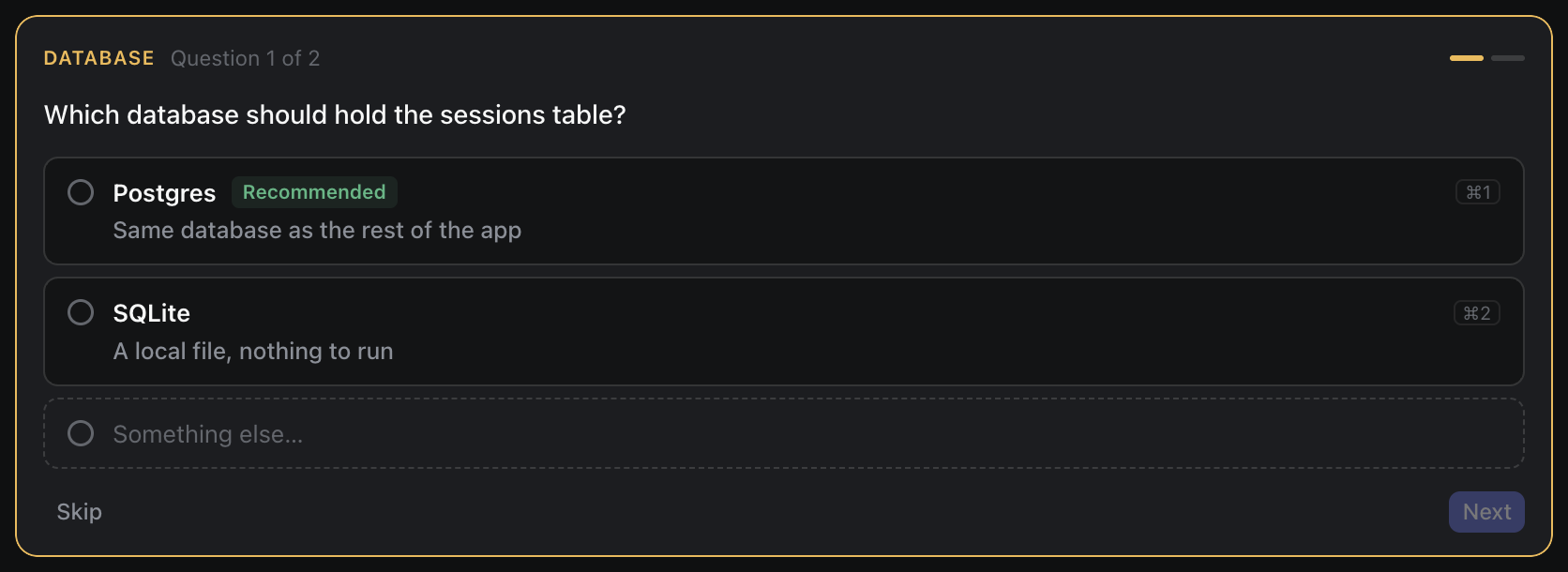
An agent's questions arrive as a card, one at a time, each choice a click or a typed answer.

An agent's question card: which database should hold the sessions table, Postgres recommended or SQLite, each with its ⌘ key, Something else…, Skip and Next

Needs attention first

The threads waiting on you sit at the top; the others gather at the bottom. Rows show the thread's name and ticket, not its branch.

Steer or queue

A message sent while Claude works either steers it now or waits for the turn to end. Tab switches.

Also

  • Repository scripts in Settings, run from the header
  • Merge beside Create PR opens the pull request and merges it
  • A status card after a long turn
  • A turn cut off by a restart or a lost network resumes
  • A turn's tool calls fold under Worked for
  • Threads name themselves; regenerate a name from a right-click
  • Sort threads by last activity or creation date
  • Changes in the right pane, each diff in its own tab
  • Drag to resize terminals
0.1.4

Pictures, Linear workspaces and a tidier sidebar

The first full day of use, and the first round of what was missing.

  • Attach pictures and files in a chat and in New task, and open them at full size
  • Connect several Linear workspaces, one per repository
  • Snooze and archive from icons on hover; old archives clear themselves
  • Each file opens in its own tab beside the thread
  • Sidebar search, a job filter, and any group folds
  • New threads start on the repository's last model
  • Fix a failed factory run in a new thread of its repository
0.1.3

Updates inside the app, and a light theme

The afternoon of the first day.

  • Updates come inside the app, not from the menu bar
  • System, Light or Dark, in Settings
  • Every factory thread in the list; answer and merge from it
0.1.2

A faster terminal, and nothing lost

Forty minutes after the first version, the terminal and the app's memory of your work.

  • A faster terminal, drawn on the GPU
  • A damaged state file no longer loses your workspaces
  • Terminals work after an install that skipped its scripts
0.1.1

The first Control Room

The first version: a Mac app that runs Claude Code and Codex threads side by side, each in its own git worktree, beside the Night Shift factory.

  • A sidebar row per thread, with its status, its time and its repository's icon
  • New task: choose the repository, then start from a sentence or a Linear issue
  • Sign in to your agent providers from Settings
  • Work delegated to agents shows in the sidebar
  • Archive a finished thread
  • Its own icon, and updates for every copy